Portfolio Development
Why So Many Portfolios Feel the Same
The answer is not more effects. It is a clearer point of view, visible proof, and presentation choices that make the work easier to understand.

The short read
The problem
A portfolio feels generic when its choices do not reveal anything specific about the designer or the work
What to do
Make the work visible, give each choice a job, and let personality clarify rather than conceal
The test
A new reader should recognize your point of view and still know what to inspect next
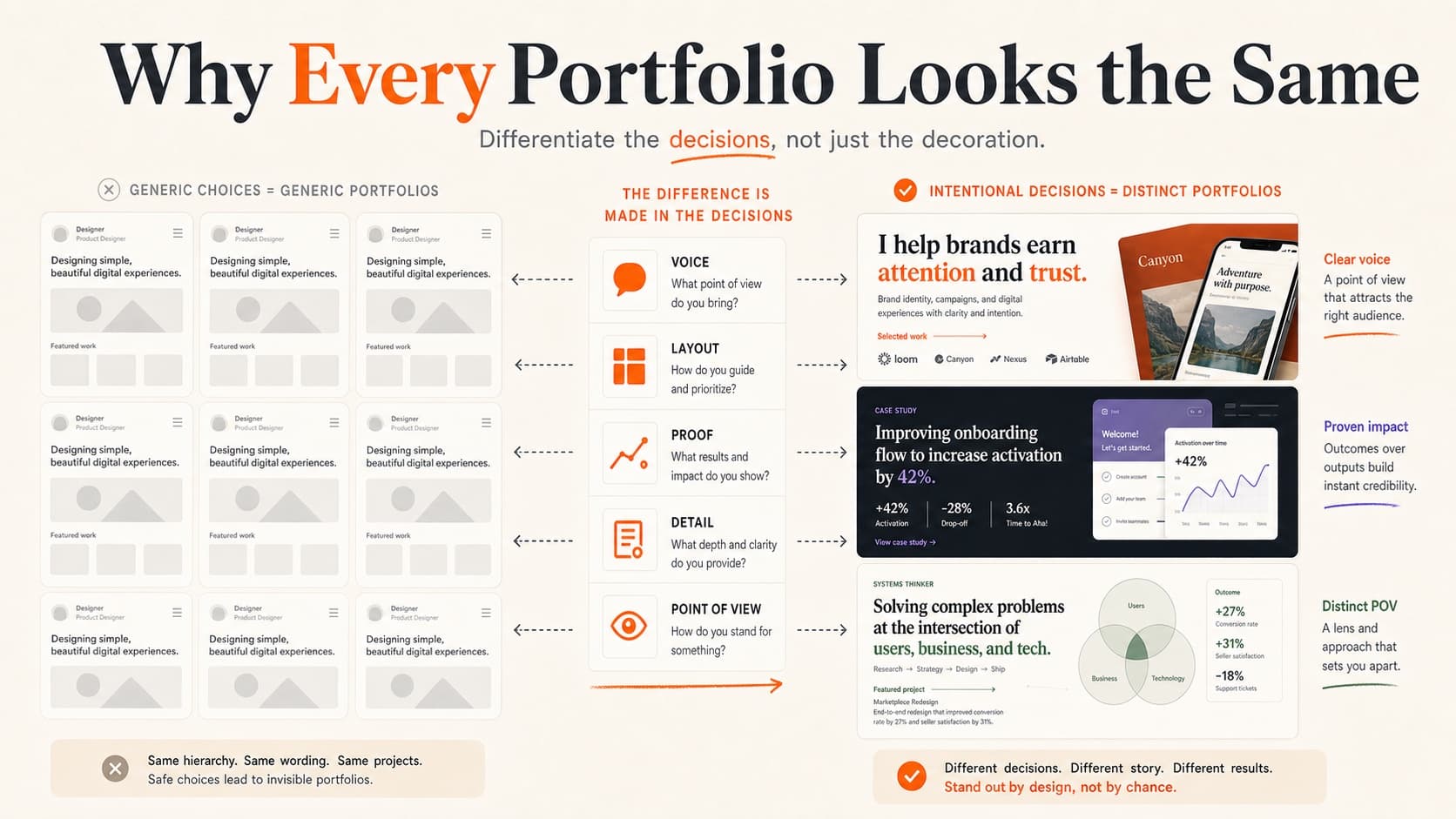
The Problem Everyone Feels
Many design portfolios use the same dependable ingredients: a clean sans-serif hero, a grid of rounded project cards, a short introduction, and case studies that follow a familiar problem-process-solution arc. None of those choices is inherently wrong. The sameness appears when the structure could hold anyone's work without changing meaningfully.
In a recent live portfolio review, professional reviewers admired unusual layouts, playful interactions, maximal color, restrained typography, and highly produced videos. Their objection was not that portfolios looked too expressive. It was that expression sometimes concealed the projects, shrank the interface, blurred project boundaries, or made navigation something the visitor had to decode.
The more useful distinction is not safe versus bold. It is default versus deliberate. A familiar grid can feel highly specific when project selection, writing, image treatment, and hierarchy express a clear point of view. An experimental site can feel generic when it repeats fashionable effects without helping anyone understand the work.
The question is not only whether the portfolio is memorable. It is whether a new reader can recognize the kind of designer you are, see convincing work, and understand what to inspect next.
How We Got Here
This didn't happen overnight. A few converging forces pushed us toward the design monoculture we're living in.
Templates became the starting point. Framer, Webflow, Squarespace, and Figma Sites can remove a large amount of setup work. That is useful. The risk appears when the sample hierarchy, imagery, and project structure remain intact even though the real work needs something different.
Reference culture compresses our choices. Inspiration feeds make effective patterns easy to find and copy. Repeated exposure can turn one useful presentation strategy into the expected answer, even when a different structure would reveal the work more clearly.
Generative tools make defaults easier to produce. AI can accelerate copy, code, imagery, and layout exploration, but a familiar glow, rounded card, cursor effect, or type treatment is not proof that AI made the result. Critique the visible sameness or distraction. Do not guess authorship from style.
Job-search pressure rewards familiar answers. A portfolio has to work for busy reviewers, so designers reasonably reach for proven conventions. The opportunity is not to reject convention. It is to decide which conventions reduce friction and which choices should communicate something more specific.
The Default Problem
Typography is a useful example because the same typeface can feel generic in one portfolio and completely appropriate in another.
Montserrat, Inter, DM Sans, and other common faces are not bad choices because they are common. A type system becomes a default when the designer never asks what tone the portfolio needs, how the work should be read, or whether the hierarchy survives real project titles and long case-study text.
Typeface selection is one design decision among many. The stronger signal is how the system behaves: whether the hierarchy is clear, the reading experience fits the work, the details feel intentional, and the typography remains legible across devices. Novelty without those qualities is not differentiation.
What Actually Differentiates a Portfolio
Standing out does not require maximalism, minimalism, or a particular visual trend. It means making choices that help the right reader recognize your work and your judgment. These five areas are places to look—not rules every portfolio has to follow.
1. Make Typography Specific
Start with the job of the type rather than the popularity of the font. Does the portfolio need editorial authority, technical precision, warmth, restraint, or energy? Then judge the system in use:
- Reading roles: Give headlines, project metadata, captions, and long-form case-study text distinct jobs.
- Real content: Test the longest title, smallest caption, dense project page, and narrow screen—not only the hero.
- Character with control: Let one or two choices carry the voice while the reading system stays coherent.
Keep a common typeface when it does the job well. Change it when the system feels disconnected from the work, lacks useful hierarchy, or cannot carry the content—not because someone else chose the same font.
2. Give the Layout a Job
The standard portfolio layout—hero, project grid, about, contact—exists because it supports common review tasks. Keep it when those tasks fit. Change it when the work needs a different hierarchy or mode of inspection.
The same layout can communicate different things for different designers. A compact index may feel confident when a substantial body of work already carries the story. Someone earlier in their career may need the homepage itself to show more context, craft, or direction. Choose the structure that helps your available work make a credible case for the opportunity you want.
- Use hierarchy to express priority. A feature-led page can direct attention to one defining project; a grid can make several projects easy to compare.
- Make the work easy to examine. Give important interfaces, motion, and visual details enough size and focus to be judged.
- Keep discovery legible. Expressive composition can reward exploration, but similar-looking elements should behave consistently and project entry points should be recognizable.
The goal is not to make the reviewer notice the layout before the work. It is to make the relationship between your point of view, project selection, and evidence feel authored rather than inherited.
3. Find Your Voice
Read your portfolio copy out loud. Does it sound like you, or does it sound like every other “I'm a passionate designer who loves solving problems” bio on the internet?
Your writing is a design material. It shapes how people experience your work just as much as your layout does. Some ways to sharpen it:
- Replace claims with specifics. Instead of “passionate problem solver,” name the product area, constraint, or kind of decision you are trusted to handle.
- Reveal a point of view. State what you pay attention to or how you work without manufacturing a provocative opinion for effect.
- Edit for signal. Keep the background that changes how someone understands your work, and move supporting detail to the place where it becomes relevant.
4. Rethink Your Case Studies
The problem-process-solution sequence is familiar enough that it can read like a template when every project receives the same treatment. That does not mean abandoning structure. It means making the opening and evidence specific to this project.
- Lead with the most interesting part. If the constraint was wild, start there. If the result was surprising, start there. Not every case study needs to begin with “The client approached us to redesign their…”
- Show one consequential turn. A rejected direction, research observation, constraint, or stakeholder decision is useful when it explains why the work changed—not simply because the process was messy.
- Quantify what you can, contextualize what you can't. “Increased conversion by 23%” is great if you have it. But “reduced support tickets about this flow from 40/week to 3” or “shipped to 200K users in a market where we had zero presence” tells a richer story.
- Include what you'd do differently. A specific reflection reveals how your judgment changed and gives an interviewer a more useful question to ask.
5. Refine the Details That Matter
Craft lives in the decisions that make the portfolio more coherent, usable, and recognizably yours. A detail matters when it improves understanding or demonstrates a capability relevant to the work you want.
- Project crops and demonstrations. Show the part of the artifact that proves the claim, at a size that supports inspection.
- Interaction states. Use motion, hover, and transitions when they clarify behavior or demonstrate interaction craft—not as mandatory decoration.
- Project boundaries. Make separate projects, before-and-after states, concepts, shipped work, and later revisions easy to distinguish.
- Small orientation cues. Clear tab titles, useful labels, loading and error states, and an obvious contact path often do more than a novelty effect.
Doing This While Exhausted
Portfolio work often happens under pressure: alongside a full-time job, after a layoff, during a career change, or while applications are already moving. That pressure makes a complete visual reinvention feel productive even when one clearer project opening would help more.
If that's you, be strategic. You do not need to redesign everything at once. Pick the first place where a new reader loses the thread: the positioning line, strongest project image, project distinction, or case-study opening. One consequential change does more than a half-finished overhaul.
Preserve personality, but judge the full set. One weaker project, unreadable demonstration, or confusing interaction can lower the perceived level of otherwise excellent work. An experiment earns its place when it shows ability, growth, or a creative direction you want to pursue.
The Real Differentiator
Visual design still matters. It shapes whether the work feels considered, whether details can be inspected, and what kind of opportunities the portfolio attracts. But visual novelty cannot substitute for clear ownership, convincing screens and examples, decisions, constraints, and honest outcomes.
The strongest portfolios make a coherent argument: this is the kind of designer I am, this is the work that proves it, and this is how to look closer. Some will be minimal. Some will be maximal. Some will make the site itself part of the evidence. The standard is not a style; it is whether the presentation and the work strengthen each other.
That is a more useful bar than simply asking whether the portfolio looks different. It protects distinctiveness without making the reviewer decode the website before evaluating the design.
Not sure where your portfolio stands? Try The Crit — paste your portfolio URL and get specific, actionable feedback on what's working and what needs work. It takes two minutes, and it's free.
Share this resource

Written by
Nikki KippleProduct Designer & UX Strategist
Designer, educator, founder of The Crit. I've spent years teaching interaction design and reviewing hundreds of student portfolios. Good feedback shouldn't require being enrolled in my class — so I built a tool that gives it to everyone. Connect on LinkedIn →
Too close to your own work?
Send one screen, case study, or URL. We'll show what's working, what's getting skipped, and what to fix next.