Fundamentals
Typography Principles for Designers Font Pairing, Hierarchy & Spacing
A practical audit for fixing type hierarchy, spacing, contrast, font pairing, and responsive behavior without turning every decision into a rule.

The short read
Fix in this order
Hierarchy, spacing, contrast, then font personality. Most pages do not need a new typeface first.
Use as a starting point
Keep the system small, constrain long lines, and test the actual content on real screens.
Accessibility check
Measure contrast, zoom to 200%, and make sure user-defined text spacing does not break the layout.
Start with a five-minute type audit
If a page feels almost right, do not open the font menu yet. The problem is usually more basic: the levels are too similar, the text column is too wide, the spacing is cramped, or the contrast is doing less work than it looked like it would in Figma.
Audit the system in the order a reader experiences it. Structure first. Reading comfort second. Typeface personality last.
- 1Blur the pageCan you still see the title, major sections, and next action? If everything becomes the same gray block, the hierarchy is too flat.
- 2Read one paragraphUse the real device and normal viewing distance. If you lose your place, inspect line length and line height before changing the font.
- 3Count the text stylesEvery distinct size, weight, color, and case treatment should have a job. Near-duplicates usually signal an unfinished system.
- 4Check contrast and zoomMeasure the actual colors, then test at 200% zoom. A tasteful gray is not useful if the text disappears or the layout breaks.
- 5Judge personality lastOnly reconsider the typeface after the structure reads clearly. A new font cannot rescue weak hierarchy or cramped spacing.
The typography principles are a connected system
Typography is the design of written language in context. The typeface matters, but so do the relationships around it: what gets noticed, how a paragraph moves, where one section ends, and whether the system still works when the content changes.
These six principles cover most of the decisions designers mean when they ask whether the typography is working. Use them as lenses, not separate boxes to check.
A practical map of typography
- Hierarchy
- Make the order of attention unmistakable.Size, weight, position, color, and spacing should agree about what matters first, second, and third.
- Legibility
- Choose forms that remain recognizable at the size and medium where they will be read.A display face can be excellent at 64px and frustrating at 16px. Judge the type in its actual role.
- Readability
- Shape a comfortable reading experience across sentences and paragraphs.Typeface, size, line height, measure, contrast, and spacing work together. No single setting can carry the whole job.
- Rhythm
- Use repeated spacing and alignment to make relationships predictable.Readers should not have to relearn how headings, captions, labels, and body copy connect on every section.
- Contrast
- Create differences that clarify roles, then verify the color values.Typographic contrast can come from scale, weight, width, case, style, or family. Color contrast is one measurable part of it.
- Resilience
- Let the system survive narrow screens, long content, zoom, translation, and font loading.A type system is more than a polished desktop frame. It has to keep working when the content or conditions change.
Decoration-first
Choose a font, then force the page around it
The typeface carries too much responsibility. Hierarchy, spacing, and content structure stay unresolved.
System-first
Name the reading job, then choose the type that supports it
The page has a clear order, a comfortable reading texture, and enough flexibility to handle real content.
Choose a typeface by role, not by stereotype
Categories help you describe construction, not predict personality. A serif is not automatically trustworthy, and a sans serif is not automatically modern. Look at the family’s proportions, stroke contrast, spacing, available styles, language coverage, and behavior at the sizes you need.
Begin with the hardest job on the page. If the project contains long articles, choose the reading face first. If it is an interface, test labels, numbers, error messages, and compact controls. If the identity depends on an expressive title, prove that display face with the actual name and the longest likely headline.
Five useful typeface categories
- Serif
- Useful when the shapes add a deliberate editorial, literary, historical, or institutional voice.Serif is a construction, not a personality guarantee. Inspect stroke contrast, spacing, italics, and small-size clarity in the family you are considering.
- Sans serif
- A flexible choice for interfaces, signage, portfolios, and long reading when the family has the range you need.Geometric, grotesque, neo-grotesque, and humanist sans serifs can feel very different. The category alone does not make a design neutral or modern.
- Slab serif
- Consider it when you need sturdy display shapes or a serif that holds up in labels and shorter text.The weight and spacing can become dense quickly. Test the exact size and line length instead of assuming every slab works for body copy.
- Monospace
- Use it when equal character widths support code, data, technical labels, or a specific voice.Monospace makes alignment predictable but usually creates a wider, more mechanical reading texture. Use it because that tradeoff helps.
- Display or script
- Reserve expressive forms for moments where recognition and voice matter more than sustained reading.Test names, numerals, punctuation, and repeated words. A striking sample can become noisy when it has to carry navigation or paragraphs.
Before you choose a family
- Set the real project name, longest heading, body paragraph, numerals, and punctuation in the font.
- Check the weights and italics you need instead of judging one regular sample.
- Confirm language, currency, symbol, and diacritic support for the actual audience.
- Read it at body size on a real device, not only enlarged in a specimen.
- Compare its fallback and loading behavior if it will be used on the web.
Fix hierarchy before you fix fonts
Hierarchy answers a simple question: what should someone notice first, second, and third? If every heading is large, every label is bold, and every card has its own style, the reader has to reconstruct the system for you.
Start with the smallest inventory that explains the page: a display or page title, a section heading, body text, and a small label or caption. Add a level only when the content has a real level to express.
A small system
Make the decision visible
Show the structure before the detail
Body text should feel quiet enough to read and strong enough to hold up on a real screen. The spacing around each level helps explain the relationship.
Supporting label
Check each level
- Role: What content belongs here?
- Difference: Is it clearly distinct from the level above and below?
- Consistency: Does the same role look the same everywhere?
- Restraint: Could two near-identical styles become one?
Build a type scale from roles, not a magic ratio
A ratio can generate numbers. It cannot decide whether your product needs five text levels or whether a 52-pixel heading fits a German translation. Pick a short set of sizes that creates the distinctions your content needs, then test it with the longest real labels and headlines.
A useful five-role inventory
- Display
- The page idea or strongest entry point.Often one per page. It can be fluid, but cap it before long words or translations break the composition.
- Section
- A clear turn in the content.It should be easy to find while scrolling and visibly closer to what follows than what came before.
- Subheading
- A smaller structure within a section.If it looks almost identical to the section heading or body copy, combine the roles or make the difference clearer.
- Body
- The default reading voice.Choose this first. Most of the page is body copy, so its size, spacing, and contrast determine the experience.
- Label / caption
- Supporting context that still has to be readable.Small is not the same as faint. Avoid shrinking or muting essential instructions just because they are secondary.
A major third, perfect fourth, or another modular ratio can give you candidate sizes. Keep only the values that produce useful differences in the real layout. Optical size matters more than mathematical purity: a large display face may look smaller than another family at the same CSS value, and a compact mobile screen may need a tighter spread.
:root {
  --text-label: 0.875rem;
  --text-body: 1rem;
  --text-subhead: 1.25rem;
  --text-section: 1.75rem;
  --text-display: clamp(2.25rem, 5vw, 4.5rem);
}Spacing, line height, and measure do most of the reading work
Type does not become readable because a formula says so. It becomes readable when the specific font, size, line length, contrast, and context work together. Use the numbers below as starting points, then adjust while reading the actual content.
Useful starting points
- Body line height
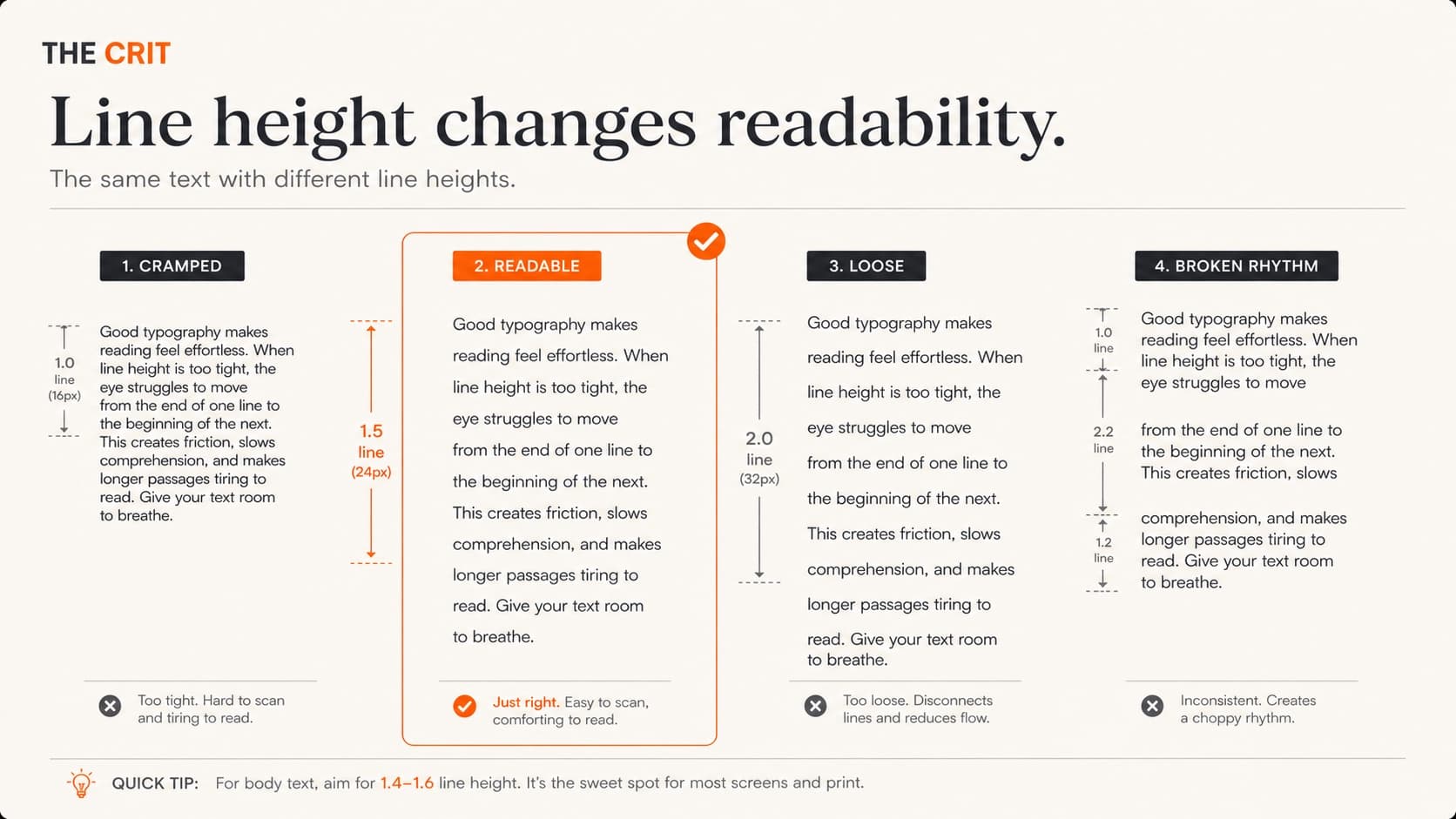
- Try 1.45–1.65, then read the real paragraph.Fonts with a tall x-height may need less. Dense copy, smaller type, or long-form reading may need more.
- Text measure
- Try a paragraph width around 60–70 characters on larger screens.This is a practical starting range, not a standard. The typeface, layout, and reading task may point narrower or wider.
- Heading rhythm
- Use more space above a heading than below it.The heading should feel attached to the content it introduces, not stranded between two sections.
- Letter spacing
- Begin with the typeface’s default spacing and adjust by role.Large display text may benefit from slightly tighter spacing. Small uppercase labels often need more. Avoid applying one tracking value everywhere.
Cramped
Every line competes with the next
Tight line height, weak paragraph breaks, and headings pressed against the previous section make a page feel denser than its word count.
Readable
Spacing explains the structure
A comfortable line height, deliberate paragraph spacing, and headings grouped with their content create a rhythm the reader can follow.
Pair fonts with a job in mind
“These fonts look good together” is not a system. A second family should solve a problem: create a stronger editorial voice, make dense reading quieter, separate data from prose, or give display text a useful contrast.
If one family can create the hierarchy, use one. Consistency is not a lack of creativity. It gives the content a stable structure and leaves more room for color, imagery, and layout to carry personality.
One-family system
Inter Semibold
Inter Regular keeps the structure quiet, direct, and easy to maintain.
Editorial contrast
Newsreader
Source Sans 3 gives longer reading a neutral counterpoint.
Structured contrast
Space Grotesk
IBM Plex Sans keeps the body practical while the headings feel more distinct.
Before you commit to a pair
- Give each family a specific role.
- Test real names, prices, dates, and long headings.
- Check every weight and style you plan to use.
- Confirm the scripts and symbols your content needs.
- Compare the pair at actual body and heading sizes.
- Remove one family and see whether anything is lost.
Need combinations to try? Use the portfolio font-pairing guide, or preview your own words in the font-pairing tool. Treat both as a starting point, then come back to the real page.
Common typography mistakes are usually system mistakes
A weak type system rarely comes down to one “bad font.” More often, several small decisions pull in different directions: a new style appears for every card, supporting text gets lighter and smaller, long lines fill the viewport, or headings grow without creating a clearer content structure.
Look for patterns across the page before polishing an isolated line. The repair should make the next page easier to design too.
Six patterns worth fixing
- Too many near-duplicate styles
- Merge styles that do the same job, then name the remaining roles.A system with 15 slightly different text styles is harder to scan and much harder to maintain.
- Hierarchy built with size alone
- Use spacing, weight, position, and width so every distinction does not require a dramatic jump.A page full of oversized headings can feel loud without becoming easier to understand.
- Body copy stretched too wide
- Constrain the reading column while letting the surrounding layout breathe.The page can use the full viewport without asking each line of text to cross it.
- Small text used as decoration
- Enlarge, strengthen, or remove supporting copy that cannot do its job comfortably.A caption, metadata line, or form instruction is still content when someone needs it.
- A new font used as the first fix
- Repair the levels, measure, spacing, and contrast before replacing the family.Changing the typeface can disguise the problem while leaving the underlying system untouched.
- The fallback state ignored
- Load the page slowly and compare the fallback with the final font.A beautiful web font can still create a poor experience if the text disappears or the layout jumps while it loads.
Responsive and accessible type is type that survives change
The clean desktop frame is only one state. Text gets zoomed, translated, enlarged, replaced by user styles, and read on screens with very different widths and brightness. A type system is finished when it can absorb those changes without losing meaning or function.
Use flexible units with deliberate limits
Use rem units for a manageable scale and clamp() when a heading should grow between sensible minimum and maximum sizes.
h1 {
  font-size: clamp(2.25rem, 6vw, 4.5rem);
  line-height: 1.05;
  max-width: 14ch;
}
Test the states your canvas hides
- 200% browser zoom on a narrow viewport.
- The longest likely heading and navigation label.
- Increased line, word, letter, and paragraph spacing.
- Bright light, dark mode, and reduced contrast conditions.
- A real screen reader heading list.
Contrast is measurable, but the threshold is not the finish line
WCAG 2.2 Level AA requires at least 4.5:1 contrast for normal text and 3:1 for large text. Check the actual foreground and background colors. Then test the weight and typeface in context, because two designs at the same ratio can still feel very different to read.
Fails AA · 2.85:1
This light gray does not reach the 4.5:1 minimum for normal text on white.
Passes AA · 4.54:1
This reaches the minimum for normal text. Test the typeface, weight, and surrounding conditions too.
Stronger · 12.63:1
This darker gray creates more contrast on white while staying slightly softer than black.
Use web fonts without turning them into a loading problem
A font file is part of the interface. It can delay text, shift the layout, or fail. Use WOFF2, request only the weights and character sets the page needs, and choose fallbacks that occupy similar space.
Do not preload every font. Preload only a truly critical file, and choose font-display based on the tradeoff you want. swap shows text quickly but can shift when the font arrives. optional avoids a late swap but may keep the fallback on a slow connection.
@font-face {
  font-family: "Project Sans";
  src: url("/fonts/project-sans-variable.woff2") format("woff2");
  font-display: swap;
  font-style: normal;
  font-weight: 400 700;
}

body {
  font-family: "Project Sans", ui-sans-serif, system-ui, sans-serif;
}
Keep the font request boring
- Use WOFF2 files for modern-browser projects.
- Request only the weights and styles that appear on the page.
- Subset only when the result still covers real content, names, and languages.
- Choose a measured fallback that reduces layout shift.
- Preload only a truly critical file unless testing proves more helps.
- Check the network request instead of assuming the font is cheap.
Before you ship the type system
Do this on the rendered page, not only in the design file. A checklist is useful when it catches something you can fix, not when it produces a perfect score.
- A first-time reader can identify the page, sections, and next action without reading every word.
- Body text is comfortable on a real phone and a laptop, not only in the design canvas.
- Long text blocks have a deliberate maximum width instead of stretching across the screen.
- Headings have more separation from the previous section than from the text they introduce.
- Normal text reaches 4.5:1 contrast and meaning never depends on color alone.
- The layout still works at 200% zoom and with user-defined text spacing.
- Font files cover every language and symbol the product actually needs.
- Only the weights, styles, and font files used by the page are requested.
- Fallback fonts are close enough that loading does not destroy the layout.
- The type choices support the content instead of becoming the content.
Checklist done. Still not sure what matters most?
Upload the page or paste the URL. Your free First Read gives you a readiness verdict and the first typography move to consider.
Want to see the criteria before sending anything? Here is what the critique checks.
Standards and implementation sources
The practical ranges in this guide are starting points, not accessibility standards. These are the current primary references behind the requirements and font-loading guidance:
QuestionsAnswers
Questions, answered.
A few practical details before you keep going
Go deeper only where you need it
Choosing type for a portfolio? Open Typography for Portfolios. Need combinations to test? Use the Font Pairings Guide or the live font-pairing tool.
Building the implementation? The CSS Typography Guide covers the code-level details without repeating the design audit.
Share this resource

Written by
Nikki KippleProduct Designer & Design Instructor
Designer, educator, founder of The Crit. I've spent years teaching interaction design and reviewing hundreds of student portfolios. Good feedback shouldn't require being enrolled in my class — so I built a tool that gives it to everyone. Connect on LinkedIn →
Too close to the page to judge the type?
Send one page or screenshot. Your free First Read gives you a readiness verdict and the first move to consider.