Fundamentals
Does Your AI-Built App Look Vibe-Coded?
A practical screen check for the moment when an AI-built app works, looks polished, and still feels hard to distinguish from familiar generated interfaces.

The short read
Fast test
If a polished screen still feels interchangeable, inspect which choices are product-specific and which arrived as defaults.
Look for patterns
One familiar choice may be appropriate. A cluster of defaults is the stronger signal that the screen needs another design pass.
Test one move
Choose one consequential decision—hierarchy, density, state, proof, or visual direction—and test it against the real task.
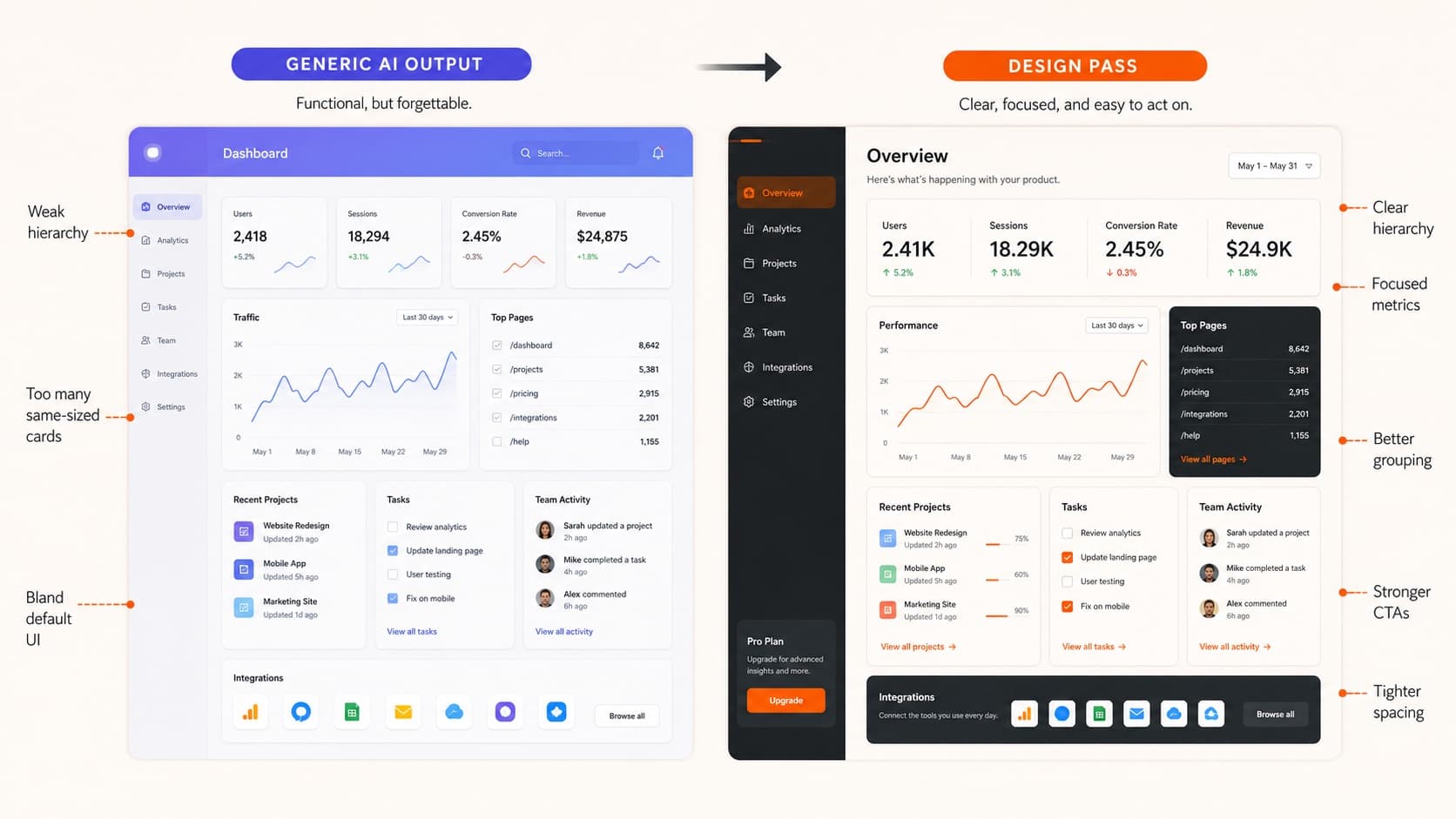
The Diagnostic
An AI-built app does not look vibe-coded because it is ugly. Most of the time, it looks vibe-coded because the tool filled in design decisions you never made.
That is why the output can feel strangely familiar: safe sans-serif type, gradient glow, rounded cards, generic icons, confident copy, and no clear reason this product should look or behave this way.
Use this page as a first-pass inspection of one real screen. Mark only what you can point to, notice where several defaults reinforce one another, and choose the decision with the biggest effect on the task.
How to Use the Check
01
Point to it
Mark only what is visible in the screen. If you need another state or viewport to confirm the concern, say that.
02
Notice the cluster
Do not turn one familiar pattern into a verdict. Look for several choices that all weaken the same product decision.
03
Test one move
Choose the change with the clearest effect on the task, then compare the result instead of restyling everything at once.
Nine Signals to Inspect
These are prompts for closer inspection, not proof that a screen is bad or AI-generated. Use the actual audience, task, content, and product constraints to decide whether a choice is helping.
Signal 1
Default typography
Look for
The screen relies on one familiar sans-serif, a narrow weight range, and a scale that could belong to almost any product.
Why it may matter
Type may be doing little to clarify the product character or the relationship between actions, content, and supporting detail.
Test next
Choose type for the product context. Then tune scale, weight, measure, and rhythm instead of asking only for a modern font.
Signal 2
Generic gradient polish
Look for
Blue-purple gradients, soft glows, glassy panels, or decorative backgrounds carry most of the visual identity.
Why it may matter
The treatment may signal a category trend without helping someone understand actions, status, or priority.
Test next
Define the jobs color needs to do—action, status, selection, brand, or emphasis—then test whether the decorative layer is still helping.
Signal 3
Card soup
Look for
Most ideas become rounded containers with similar padding, icons, headings, and short body copy.
Why it may matter
When every block has equal visual weight, the workflow and the most important decision can become harder to scan.
Test next
Keep containers where grouping is meaningful. Let primary work areas, tables, timelines, and forms use structure without an extra box when they do not need one.
Signal 4
Weak hierarchy
Look for
The headline, status, primary action, secondary action, and supporting copy compete at a similar level.
Why it may matter
The screen may ask people to inspect everything before they can tell what matters now.
Test next
Name the first thing someone needs to understand, the action that deserves emphasis, and what can become quieter or arrive later.
Signal 5
Missing states
Look for
The happy path looks finished, but loading, empty, error, disabled, long-content, narrow-screen, or edge states are not represented.
Why it may matter
An interface can feel convincing in a single frame while leaving the moments that shape trust unresolved.
Test next
Choose the highest-consequence missing state—such as a failed upload, no results, a slow response, or a saved change—and design that next.
Signal 6
Stock iconography
Look for
A broad set of familiar outline icons appears beside headings or labels, even when the symbol adds little meaning.
Why it may matter
Repeated decorative symbols can make the screen feel assembled without making actions or status easier to recognize.
Test next
Keep icons where they clarify repeated actions, status, or navigation. Remove the ones that only repeat nearby text.
Signal 7
Proof-free polish
Look for
The screen makes outcome claims without a nearby example, artifact, constraint, comparison, or clear account of how the result is produced.
Why it may matter
The surface may look credible while leaving the most important promise difficult to evaluate.
Test next
Add the kind of proof the claim can honestly support: a sample output, workflow step, real scenario, comparison, or measured result.
Signal 8
Mismatched density
Look for
A frequent-use work surface uses promotional spacing, or a lightweight experience presents dense controls before they are needed.
Why it may matter
The pacing may not match how often, how quickly, or how deeply someone needs to use the product.
Test next
Match density to the job. Repeated work often benefits from tighter scanning; orientation and storytelling can use more space.
Signal 9
Unclear product lane
Look for
The first screen could plausibly belong to many AI productivity, analytics, or dashboard products.
Why it may matter
The interface may not yet signal the user, job, artifact, or constraint that makes this product distinct.
Test next
Make the product-specific job and constraint easier to see. Specific evidence is usually more useful than broadly impressive language.
A Replacement Prompt
Once you find the pattern, give the tool a better brief. The goal is not more decoration. The goal is a more specific decision and a result you can compare.
Revise this screen for [user] doing [job]. Make [primary action] easier to find and [secondary content] quieter. The current [visible choice] may be weakening [goal]; preserve it if it supports the task, or test [specific alternative] if it does not. Show the relevant [empty / loading / error / long-content] state. Use typography, density, and color to communicate priority, and explain the tradeoff behind the revision.
The more fluently you can describe layout behavior, states, and constraints, the better the output gets. That is the point of browser fluency for designers.
The Proof Pass
The strongest AI-built interfaces do not just look better. They make the product, action, user, constraint, and result easier to understand.
Before you ship, ask five questions:
- 1.After a first pass, is there enough evidence to understand who this is for and what it helps them do?
- 2.Is the primary action visually clear in the current context?
- 3.Does the visual system support the product and task?
- 4.Are the highest-consequence non-happy-path states designed?
- 5.Is there appropriate proof behind the claims?
This is the practical companion to polished AI UI becoming cheap. That guide is about the larger shift in design judgment; this check helps you inspect one screen now.
If This Screen Is Going in Your Portfolio
The bar gets sharper when an AI-built screen becomes career evidence. A hiring reviewer is not only asking whether the interface looks finished. They are asking whether the work makes your taste, ownership, constraints, and decision quality visible.
Add these proof notes before you publish it:
- What you directed: the product context, hierarchy, states, interaction behavior, content model, or visual system you specified instead of accepting defaults.
- What changed after critique: one before-and-after decision that shows how your judgment shaped the generated draft.
- What constraint mattered: mobile density, accessibility, trust, repeated use, production feasibility, or the real workflow the screen had to support.
- What remains uncertain: the assumption, state, or outcome that still needs testing rather than a claim the current artifact cannot prove.
That proof belongs in the larger hiring-ready portfolio packet. The website earns the click, but the packet has to show how your decisions shaped the AI-assisted work.
QuestionsAnswers
Questions, answered.
A few practical details before you keep going
Share this resource

Written by
Nikki KippleProduct Designer & Design Instructor
Designer, educator, founder of The Crit. I've spent years teaching interaction design and reviewing hundreds of student portfolios. Good feedback shouldn't require being enrolled in my class — so I built a tool that gives it to everyone. Connect on LinkedIn →
Ready for a read on the actual screen?
The self-check helps you frame the question. A free First Read inspects one submitted screen or URL and starts with the decision most likely to improve it.