Career & Jobs
Present Your Portfolio as a Design Conversation
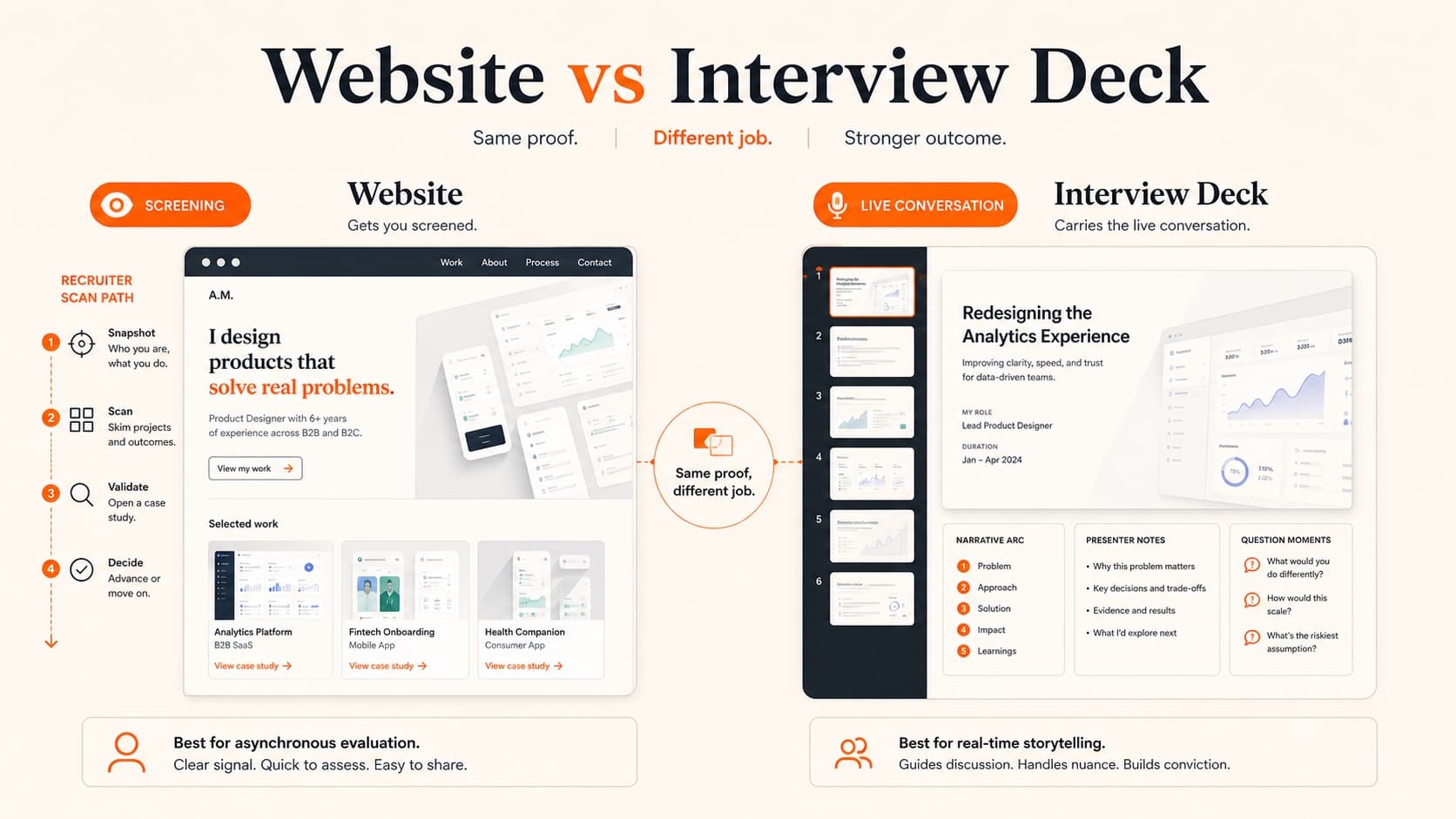
The interview presentation is not your case study read aloud. It is a guided conversation about context, ownership, evidence, tradeoffs, craft, and what you learned.

The short read
Start with
The employer’s format, timing, audience, and project expectations
Build for
Questions, interruptions, and different levels of detail
Show
Ownership, constraints, alternatives, decisions, evidence, and craft
Prepare
A local backup, tested screen share, readable slides, and accessible media
Get the Brief Before Building
Use the invitation first. If important details are missing, ask the recruiter or coordinator:
- How much total time is scheduled, and how much should be reserved for questions?
- How many projects or what types of work should I cover?
- Who will attend, and what are their roles?
- Is there a prompt, competency rubric, or required format?
- Will I present in person, share my screen, or send the file beforehand?
- Are there accessibility or technology requirements I should plan for?
Select Projects for This Audience
Choose evidence, not just attractive outcomes. Score each candidate project against the job's important capabilities: problem type, level of ownership, collaboration, research, systems thinking, interface craft, domain knowledge, delivery, and reflection.
Lead with the project that best establishes fit and that you can discuss honestly. Use another project only when it adds a different, relevant signal. Avoid showing confidential work whose constraints leave the story impossible to understand.
Build the Spoken Story
Orientation
What is the product or service, who was it for, and why is this project relevant to the role?
Responsibility
What did you own, what did teammates own, and where did you influence the outcome?
Problem and constraints
What made the problem difficult: users, business, technology, access, time, policy, or uncertainty?
Evidence and decisions
What evidence changed the direction? Which alternatives or tradeoffs did you consider?
Result
What shipped, changed, was learned, or remains unproven? What is the source and limit of the evidence?
Reflection
What would you keep, change, validate, or measure next?
The case study structure guide can help you find the evidence; the presentation should compress and sequence it for live explanation.
Design a Modular Deck
Create one core deck with clear section boundaries, then rehearse three paths:
Short path
Orientation, one decisive moment, result, and reflection. Use when time shrinks.
Core path
The complete story that fits the stated brief and leaves discussion room.
Expanded path
Appendix slides for research detail, alternate concepts, systems, craft, and technical questions.
Keep a visible agenda or section divider, number slides when useful, and place appendix material after the closing slide. These choices help you recover after an interruption.
Show Judgment, Not Ceremony
- Show a research artifact only when it changed the problem, priority, or design direction.
- Pair important screens with the requirement, constraint, or tradeoff they resolve.
- Show rejected options when the comparison reveals your decision criteria.
- Name disagreement or critique and explain how you responded.
- Make interface details readable at the size the panel will actually see.
- Separate your contribution from team decisions and organizational outcomes.
- Label illustrative, proposed, tested, shipped, and measured material accurately.
Handle Questions Honestly
Answer pattern
Acknowledge the question → answer directly → show the relevant evidence → name the limit or tradeoff → confirm whether they want more depth.
- If you do not know, say what you know, what you do not, and how you would find out.
- If a premise is incorrect, clarify respectfully and use evidence.
- If you would change the work now, explain why; reflection is not failure.
- If confidentiality blocks an answer, name that boundary and offer a safe parallel example.
- If one person dominates, answer concisely and return to the group or story.
Prepare the Room and Backup
- Test the actual meeting platform, screen resolution, audio, camera, and presenter controls.
- Close notifications, unrelated tabs, private files, and messaging apps.
- Keep the deck downloaded locally and export a PDF backup.
- Send or save a view-only link that does not require unexpected permissions.
- Use large type, strong contrast, concise slide copy, and captions for meaningful video.
- Do not depend on auto-playing prototypes or live internet access for the core story.
- Keep a one-page note with the opening, transitions, evidence limits, and closing questions.
Practice for Adaptation
- Content rehearsal: confirm the story and evidence before polishing delivery.
- Timed rehearsal: practice the short, core, and expanded paths against the real brief.
- Interruption rehearsal: ask a peer to question, redirect, or shorten the session.
- Technical rehearsal: present through the real platform while another person watches the shared view.
- Recall rehearsal: practice without a script so the spoken explanation remains natural.
- Question rehearsal: prepare honest answers about ownership, tradeoffs, conflict, failure, metrics, and what you would change.
Sources and Further Reading
- Nielsen Norman Group: User Experience Careers report — UX hiring-manager research, portfolio expectations, and interview context.
- Nielsen Norman Group: UX Hiring—Insights from a Design Recruiter — how different reviewers use portfolio material.
- Nielsen Norman Group: 5 Steps to Creating a UX-Design Portfolio — matching portfolio format and content to purpose.
QuestionsAnswers
Portfolio Presentation Questions
A few practical details before you keep going
Share this resource

Written by
Nikki KippleProduct Designer & Design Instructor
Designer, educator, founder of The Crit. I've spent years teaching interaction design and reviewing hundreds of student portfolios. Good feedback shouldn't require being enrolled in my class — so I built a tool that gives it to everyone. Connect on LinkedIn →
Too close to your own work?
Send one screen, case study, or URL. We'll show what's working, what's getting skipped, and what to fix next.