Tools & Workflow
Adobe Creative Cloud in 2026 Which Apps Are Worth Paying For?
Choose the apps by the work you ship, understand what Firefly adds, and stop treating the largest bundle as the default.

The short read
Choose by output
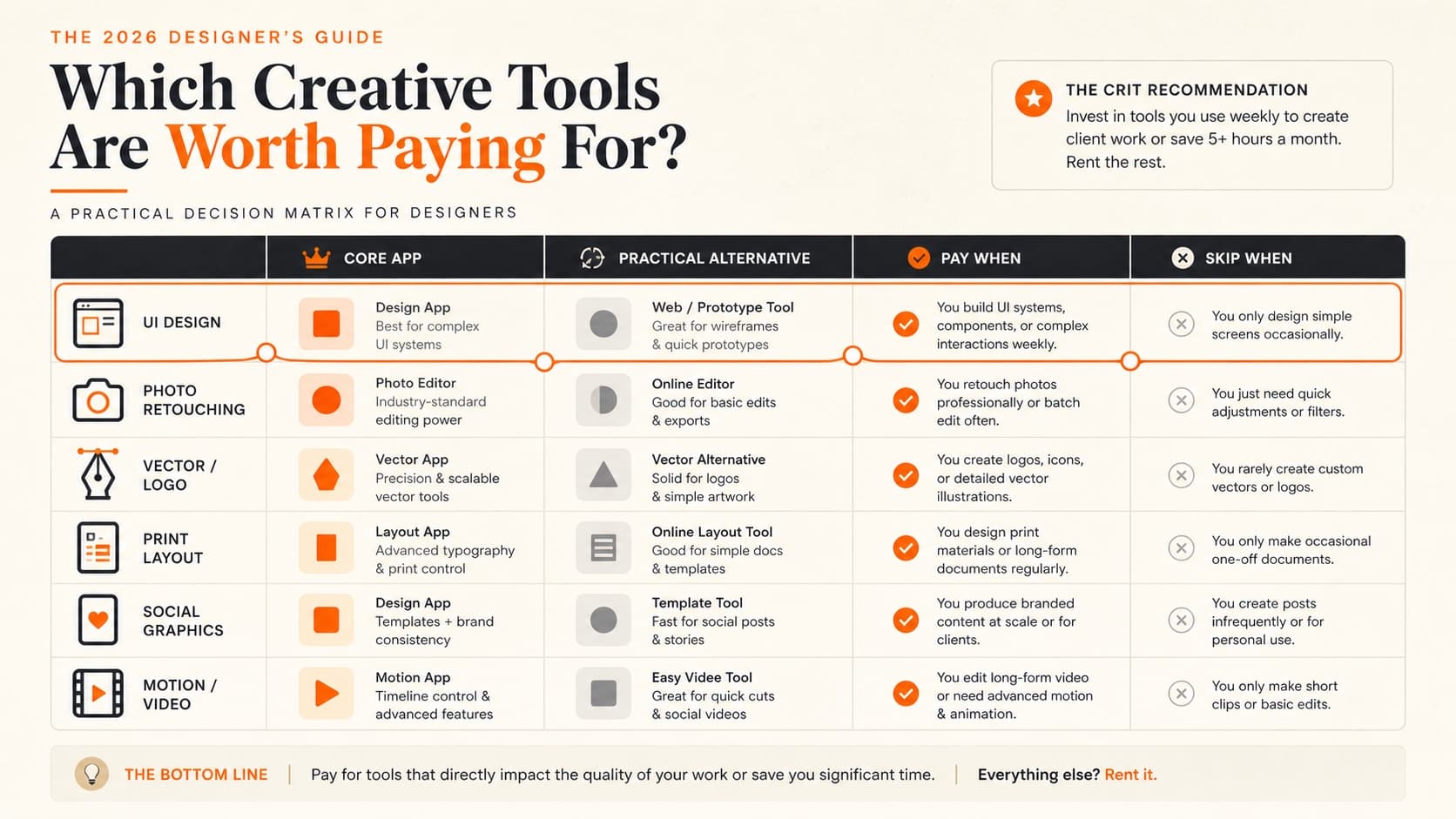
Pay for the apps attached to work you actually deliver. A large bundle is not automatically a better workflow.
Full-suite case
Creative Cloud Pro makes the most sense when several Adobe desktop apps are part of the same recurring practice.
AI is another plan decision
Firefly now spans images, video, audio, partner models, and generative credits. Check the credit rules, not just the feature list.
Start with the deliverable, not the bundle
Adobe still makes deep professional tools. That does not mean every designer needs twenty-plus apps. A brand designer may live in Illustrator and Photoshop. An editorial designer may need InDesign every week. A product designer may spend most of the month in Figma and open Photoshop only for image work.
List the files you ship, the formats clients or teammates require, and the apps you used in the last thirty days. Then compare the actual single-app total with Creative Cloud Pro. The right plan is the least expensive one that supports the real workflow without forcing awkward handoffs.
Current US plan check
These were Adobe's visible US prices on August 20, 2026. They are reference points, not permanent promises. Promotions, taxes, regions, education eligibility, annual commitments, and cancellation terms can change the checkout total.
| Plan | Listed price | Billing note | Use it when |
|---|---|---|---|
| Photoshop | $22.99/mo | Annual, billed monthly | You need desktop photo editing, compositing, retouching, or digital image production. |
| Illustrator | $22.99/mo | Annual, billed monthly | You produce logos, icons, vector illustration, lettering, packaging, or scalable artwork. |
| Photography | $19.99/mo | Annual, billed monthly | You need Photoshop and Lightroom for a photography-heavy workflow. |
| Creative Cloud Pro | $69.99/mo | Annual, billed monthly | Several Adobe desktop apps are part of the work you ship, not just apps you may open someday. |
| Firefly Standard | $9.99/mo | Monthly; 2,000 credits listed | You need Firefly image, video, or audio exploration without the full Creative Cloud bundle. |
| Firefly Pro | $19.99/mo | Monthly; 4,000 credits listed | You need more premium generations plus the current bundled web and mobile app access. |
Do not compare a promotional month with a normal annual cost
Adobe often shows introductory offers. Compare the regular price, commitment, renewal date, included storage, generative credits, and cancellation terms. A discount can change the first bill without changing whether the plan fits your practice.
Choose each app by the job it owns
Photoshop
Useful for: Retouching, compositing, raster artwork, image cleanup, and production-ready mockups.
Be careful: Do not keep it only for simple crops, resizing, or social templates that another tool already handles well.
Illustrator
Useful for: Logos, identity systems, icons, precise vector drawing, packaging artwork, and scalable illustration.
Be careful: A product designer who rarely creates vectors may not need a permanent subscription.
InDesign
Useful for: Multi-page editorial systems, books, reports, print production, and documents with serious typography.
Be careful: It is unnecessary for a one-page PDF or a slide deck that another tool can maintain more easily.
After Effects
Useful for: Motion design, compositing, title sequences, interface motion studies, and animation production.
Be careful: Figma Motion or a lightweight web animation tool may be enough when the deliverable is only product-behavior intent.
Premiere
Useful for: Longer-form editing, multicamera work, audio timelines, color workflows, and Adobe-connected video production.
Be careful: A short social cut or screen recording may not justify a full professional editing stack.
Acrobat Pro
Useful for: PDF editing, review, accessibility, forms, signatures, redaction, and document workflows.
Be careful: Check whether your existing PDF or document tools already cover the narrow task you need.
Used the right app. Still not sure the piece is ready?
Upload one piece. Your free First Read gives you a readiness verdict and one priority move.
When Creative Cloud Pro actually pays off
The full plan earns its place when the apps form a connected production workflow. A brand team may move from Illustrator to Photoshop to InDesign. A motion team may use Photoshop, Illustrator, After Effects, Premiere, and Audition. A photographer may be better served by the Photography plan because the broader bundle adds little to the work.
The bundle is doing real work
- • Three or more desktop apps are used regularly.
- • Shared libraries, fonts, storage, or app-to-app handoff reduce production time.
- • Client or team deliverables require Adobe-native files.
- • The plan replaces separate tools you would otherwise buy.
The bundle is mostly insurance
- • One app handles almost all paid work.
- • The other apps are installed but rarely opened.
- • The practice is primarily product UI, simple web content, or lightweight social production.
- • A narrower plan already covers the formats you ship.
Firefly is now a separate workflow and budget decision
Firefly is no longer only Generative Fill inside Photoshop. Adobe's current plan pages cover image, video, audio, translation, Boards, partner models, and generative credits. Standard image features and premium features do not always use the same limits.
Decide what you need to generate and where the output must remain editable. Integrated fill and cleanup inside Photoshop can remove a handoff. A standalone Firefly plan can make sense for broader generation. Neither plan replaces art direction, source review, rights checks, or a designer judging whether the output belongs in the work.
A practical starting point by practice
Product and UI design
Keep Figma at the center. Add Photoshop or Illustrator only when image or vector production is a recurring part of the work.
Brand and visual identity
Illustrator is often the anchor. Add Photoshop for image work and InDesign when the identity extends into multi-page documents.
Editorial and publication design
InDesign is the system. Photoshop and Illustrator support image and vector assets; the full plan depends on how often all three are used.
Motion and video
After Effects and Premiere can justify the broader bundle quickly when motion, editing, and Adobe asset handoff are part of the same project.
Photography
Compare the Photography plan with Photoshop alone before buying the full suite. Lightroom plus Photoshop is often the actual workflow.
Students and early-career designers
Match the plan to the class and discipline. Verify current education terms, and learn transferable design fundamentals instead of treating software familiarity as the whole skill.
Use something else when it keeps the work simpler
Figma is the current center for shared product design. Affinity can cover many raster, vector, and publication workflows for people who do not need Adobe-native handoff. Canva and Adobe Express are often faster for repeatable campaign formats and social production. DaVinci Resolve is a serious video option. A browser-based tool may be enough for a one-off image adjustment.
Do not choose an alternative because an article assigns it an arbitrary score. Test the hardest real deliverable: color handling, type, export, collaboration, accessibility, automation, handoff, or file compatibility. The constraint that breaks the work matters more than the feature count.
If your remaining Adobe dependency is XD, use the Adobe XD to Figma migration guide instead of comparing two tools as though both were receiving current product investment.
Sources and price caveats
- Adobe Creative Cloud plans: current app bundles, plan names, and checkout terms.
- Adobe Photoshop plans: Photoshop, Photography, and Creative Cloud Pro comparison.
- Adobe Illustrator plans: individual and bundle pricing.
- Adobe Firefly plans: current tiers, credits, and included features.
- Adobe generative credits FAQ: how plan credits and add-ons work.
- Adobe XD support status: maintenance-mode wording and support boundary.
US product and pricing pages checked August 20, 2026. The article avoids temporary promotional prices in its recommendation because offers and expiration dates change faster than the underlying plan fit.
QuestionsAnswers
Adobe Creative Cloud questions
A few practical details before you keep going
Share this resource

Written by
Nikki KippleProduct Designer & Design Instructor
Designer, educator, founder of The Crit. I've spent years teaching interaction design and reviewing hundreds of student portfolios. Good feedback shouldn't require being enrolled in my class — so I built a tool that gives it to everyone. Connect on LinkedIn →
Adobe polish can still hide the real problem.
Send one layout, portfolio piece, or visual system. We will look at the work, not award points for the software.